
Xiaomi Earbuds
Screenshots
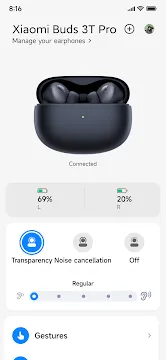

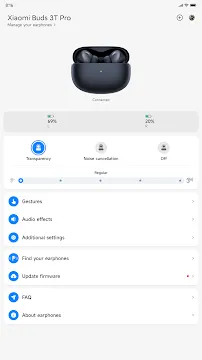

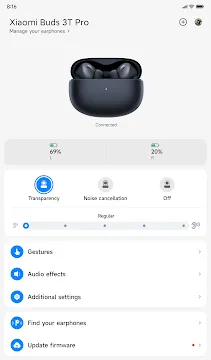

Xiaomi Earbuds is the official application designed to help you manage and customize your wireless audio devices. This app provides a central interface for users to unlock the full potential of their hardware. While many earbuds offer basic plug-and-play functionality, this software allows for deep personalization. You can adjust sound profiles, update software, and check battery levels with ease. It works across a wide range of devices to ensure a seamless listening experience. By using this tool, you gain total control over your audio environment.
The Core Features of the Xiaomi Earbuds App
The application offers several essential tools to improve your daily use. Once you connect your hardware, the main dashboard shows the exact battery percentage for each bud and the charging case. This helps you avoid running out of power during important calls or trips. Furthermore, the app includes a “Find my earphones” feature. If you misplace a bud nearby, you can trigger a loud sound to locate it quickly.
The interface is clean and user-friendly. You do not need technical skills to navigate the menus. Most settings are accessible with a single tap. This simplicity ensures that everyone can enjoy high-quality audio without frustration. The app also supports “In-ear detection” toggles. You can decide if your music should pause automatically when you remove a bud.
How to Set Up Xiaomi Earbuds for Mobile Users
Getting started is a straightforward process. First, download the application from the official store. Ensure your Bluetooth is active before opening the software. Place your earbuds inside the case and keep the lid open. The app should detect the device almost instantly. If you use a compatible modern device, a fast-pair pop-up might appear on your screen.
Follow the on-screen instructions to complete the pairing. Once connected, the app remembers your device for future use. You can rename your earbuds to make them easier to identify. This setup process ensures a stable connection for music and calls. It also allows the app to sync your preferences across different sessions.
Customizing Gestures with Xiaomi Earbuds
One of the best parts of using this app is changing how your buds react to touch. Every user has different habits. Some prefer a double-tap to skip songs, while others want it to activate a voice assistant. Within the settings menu, you can remap these gestures for both the left and right buds.
Common gesture options include:
- Play and pause music.
- Skip to the next track or go back.
- Adjust volume levels directly.
- Answer or end phone calls.
- Switch between different sound modes.
By tailoring these controls, you reduce the need to reach for your phone. This makes the experience much more convenient during workouts or commutes.
Advanced Noise Cancellation and Transparency Modes
High-end audio devices often feature Active Noise Cancellation (ANC). The app lets you manage this feature with precision. You can choose between different levels of noise reduction based on your surroundings. For example, use “Deep” mode in a noisy airplane and “Light” mode in a quiet office. This flexibility helps you stay comfortable while blocking out distractions.
Transparency mode is equally important. It allows ambient sound to pass through the speakers. This is helpful when you need to hear traffic or talk to a friend without removing your gear. The app provides a toggle to switch between these modes instantly. You can also enable “Enhance voice” to make conversations clearer while keeping the buds in your ears.
Keeping Your Device Updated via the App
Software updates are vital for maintaining performance. Xiaomi frequently releases firmware updates to fix bugs and improve sound quality. The application notifies you whenever a new version is available. Installing these updates is simple and takes only a few minutes.
To ensure a successful update:
- Keep the earbuds inside the charging case.
- Ensure the case lid remains open.
- Keep your phone close to the earbuds.
- Make sure your battery is above 20%.
Regular updates can also add new features that were not available at launch. This keeps your hardware feeling fresh and modern for a longer time.
Audio Personalization and Equalizer Settings
Everyone enjoys music differently. Some people love heavy bass, while others prefer clear vocals. The app includes various equalizer presets to match your taste. You can switch between profiles like “Bass boost,” “Treble boost,” or “Voice enhancement.” These changes happen in real-time, so you can hear the difference immediately.
Additionally, the app manages dual-device connections. This allows you to stay connected to two sources at once. You can watch a movie on a tablet and automatically switch to your phone when a call comes in. This smart switching is a major benefit for multi-taskers. It eliminates the need to manually disconnect and reconnect every time you change devices.
Conclusion
The Xiaomi Earbuds application is a must-have tool for anyone owning compatible hardware. It transforms a simple pair of headphones into a smart, customizable audio system. From gesture controls to advanced noise management, the app provides everything you need for a premium experience. It simplifies technical tasks like firmware updates and battery monitoring. By using this software, you ensure that your audio gear works perfectly every day. The intuitive design and powerful features make it an excellent companion for your mobile lifestyle.